Batch payments

Batch payments eliminate the hassle of sending thousands of payments manually.
At Equals Money, the introduction of Batch Payments was both a strategic and design-led opportunity. On the business side, we saw a clear need to support larger companies and grow FX volume, but our existing payments flow wasn't built for scale. Customers had to process each payment individually, with every transaction manually validated by our internal team. This made the process slow and cumbersome, especially for finance teams with recurring payment runs. As a result, many high-volume clients turned to workarounds, such as sending CSVs directly to account managers.
From a design perspective, our challenge was to streamline this experience and build greater confidence in the platform's ability to handle large volumes efficiently. We set out to learn from our customers' needs to create a seamless, self-serve flow that enabled thousands of payments in a single upload, supported straight-through processing, and fit naturally into the existing tools and workflows our users already relied on.
How might we design a solution that removes friction, scales with user needs, and builds trust in the process?
We began by mapping the existing journey and speaking to high-volume customers. Many were already preparing payments in CSVs but lacked a reliable way to process them at scale. Internally, every payment required manual validation, creating bottlenecks and slowing down operations. We designed a flow that let users upload, review, and submit thousands of payments in just a few clicks — mirroring how finance teams already worked. With real-time validation, clear error messaging, and the foundation for straight-through processing, we reduced friction while giving users more speed and confidence.
What I learned from customers
To gain an understanding of the key motivations, behaviours, and pain points of people who wanted to make batch payments, I spoke with direct customers, white label customers, API customers, and the Equals Money internal team about their needs. Here were the key findings:
Templates and reusability is key
Users need the ability to save and reuse payment templates, especially for recurring payments such as payroll. In many cases, users preferred making their edits in a spreadsheet where they could easily add in their own data from other spreadsheets they would often have on hand. In particular, users considered CSV import and export of batch payments to be a time-saving feature. Additionally, being able to copy a previous batch payment to create a new one was seen as useful.
If it's payroll, it's very likely that it's going to be the same people every time, or just maybe slightly adjusted — like maybe someone just got hired and needs to be added. It's kind of the idea there, just to save time, really.
Flexibility to pay in any currency, from any balance, to multiple people
Equals Money users have a wide range of use cases, and needed the flexibility to pay in any currency and from any balance. They often want to pay multiple recipients, possibly in different currencies, within a single batch payment. Customers also emphasised the need to send multi-currency batch payments from a single file.
We need to process payments for multiple crew members, often in different currencies. A batch payment feature would save us significant time.
Resolve errors without restarting the whole process
Overall, the feedback consistently pointed towards a desire for granular error handling and the flexibility to address issues without having to redo the entire batch payment process from scratch. Clear error handling and payment validation in the UI and the CSV was desired.
What we do is we actually send back a CSV file with an extra column, which is the error column. We put an arrow next to each transaction that has an error, so they can quickly see which ones have errors, fix those in the CSV file, and then re-upload it.
Built-in approval workflows are a need
Many users, especially in larger organisations or those who process payroll, require built-in approval processes for batch payments. In particular, users requested features such as multiple approval levels, role-based permissions, and transparency in the approval workflow.
We have to have those controls in place to make sure that if somebody's got to be paid, it's got approval at every stage — dual approval, coming from multiple levels of the business.
Scheduling for a future date
The need to schedule recurring payments would be a key part of workflows such as payroll.
Monday mornings, I'd have like 12 pages of payments to go through. The vast majority of our clients get paid on a Monday morning.
What I learned from competitors
I began my research by collecting information about the features deployed by existing apps with batch payments. I compared various apps by looking at several key features, including input methods, currencies supported, approvals, error handling, and scheduling. I found that across existing apps, most batch payments features did not allow users to add funds directly from the batch payment flow or pay from multiple source currencies and balances, and the features were typically not available on mobile.
| Feature | Revolut | Wise | Starling |
|---|---|---|---|
| CSV upload | |||
| Multi-currency batches | Yes, but in 1 source currency | ||
| Number of currencies supported | 25 | 40 | GBP only |
| Max number of payments | 1,000 | 1,000 | 250 |
| Pay from multiple source balances | |||
| Editing in the UI | Yes, but limited | ||
| Error handling | Errors shown in the CSV. Re-upload CSV to fix the batch. | Errors shown in CSV and UI. Limited editing in a popup. Re-upload CSV to fix the batch. | Errors shown in UI — errors, duplicates, and un-payable recipients. Re-upload CSV to fix the batch. |
| Integration with accounting software | |||
| Review & approval process | |||
| Scheduling | |||
| Save as draft or submit and complete later | Save as draft | Submit and complete later | Save as draft |
| Available on mobile | |||
| API | |||
| Top up funds in flow |
User persona
We then organised these key findings into a user persona:

Alex
Alex manages payroll and vendor payments for a company with 100+ employees across multiple countries. They need to process batch payments regularly in various currencies.
I need a solution that allows me to efficiently process payments to multiple countries, currencies, and recipients all at once. This would save us significant time and reduce the complexity of our monthly payroll process.
- Efficient batch payment processing for payroll and vendors
- Ability to handle multiple currencies in a single batch payment
- CSV upload functionality for batch payments
- Option to save and reuse payment templates
- Clear visibility into fees and exchange rates
- Ability to schedule recurring payments
- Multi-tier approval process based on value
- Scheduling and ability to book in a batch on a future date
- Integration with accounting software
- Create and approve confidential payments
- More risk of human error with manual entry of payments
- Current process is time-consuming — has to do 100+ transactions at a time and would like to simplify by uploading a spreadsheet or CSV file
- Spends time following up with approvers via email or Slack to get a batch approved
Prioritisation
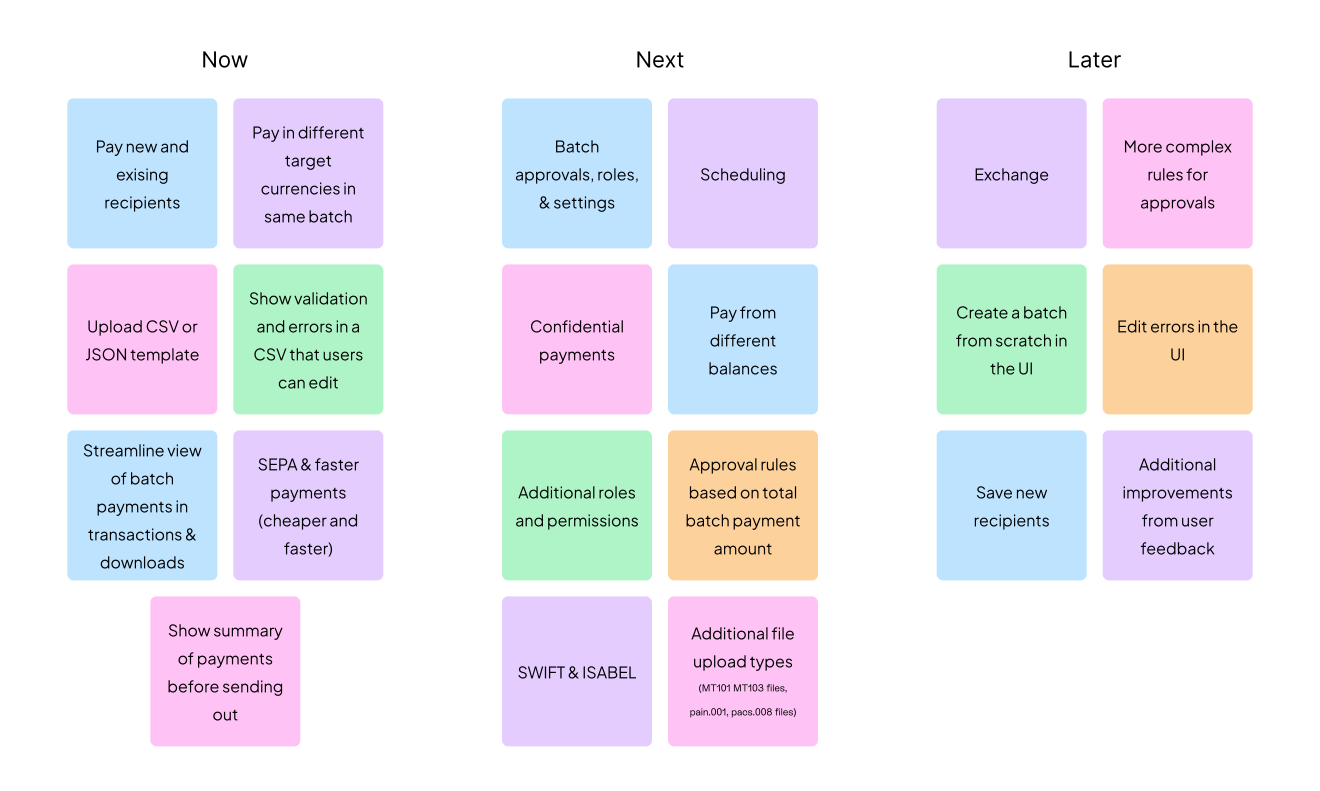
Guided by the user persona, I worked with Product and Engineering to group potential features into must-haves, nice-to-haves, and not-needed. We prioritised based on customer feedback, technical constraints, and speed to value.
Milestone 1 focused on core backend features like file upload, sending payments, and reviewing summaries. We skipped advanced UI elements like inline editing, since users preferred editing their CSVs externally, and instead focused on strong validation and error handling to launch quickly and gather feedback. We also added support for multiple currencies and funding from different balances in the same batch.
Milestone 2 included features needed for payroll, like payment approvals, confidential payments, scheduling, and amount-based approval rules.
Milestone 3 focused on usability improvements, such as inline editing, which are helpful but not essential — so we saved them for later.
User flow
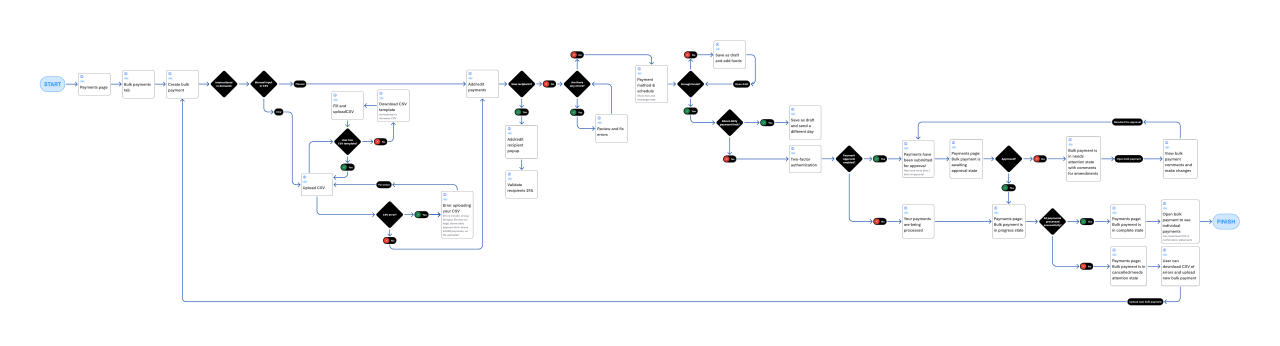
The features were then organised into a high-level user flow:
Early designs
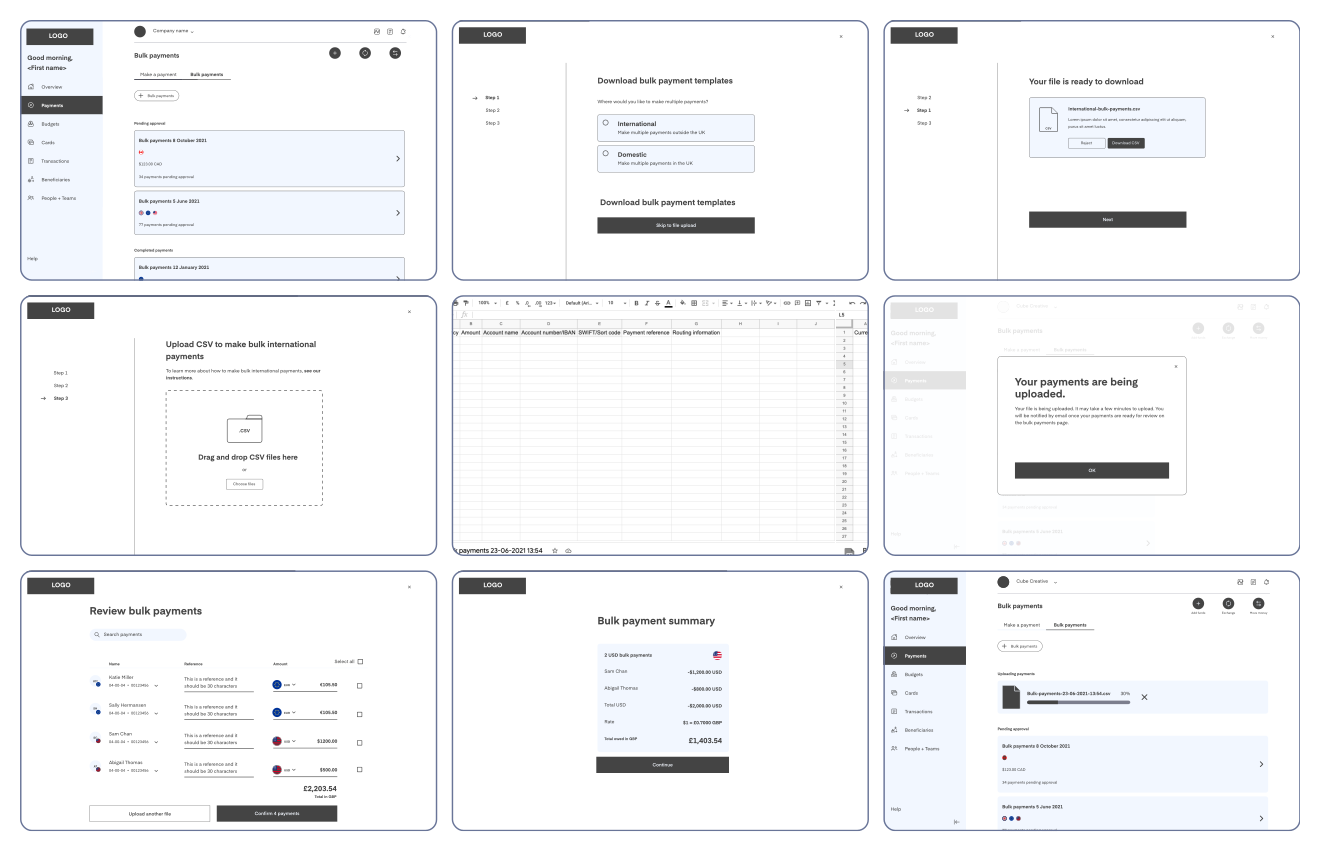
Upon creating the user flow, I began to brainstorm and visualise my ideas into a low-fidelity prototype, and started user testing with it.
What I learned from user testing
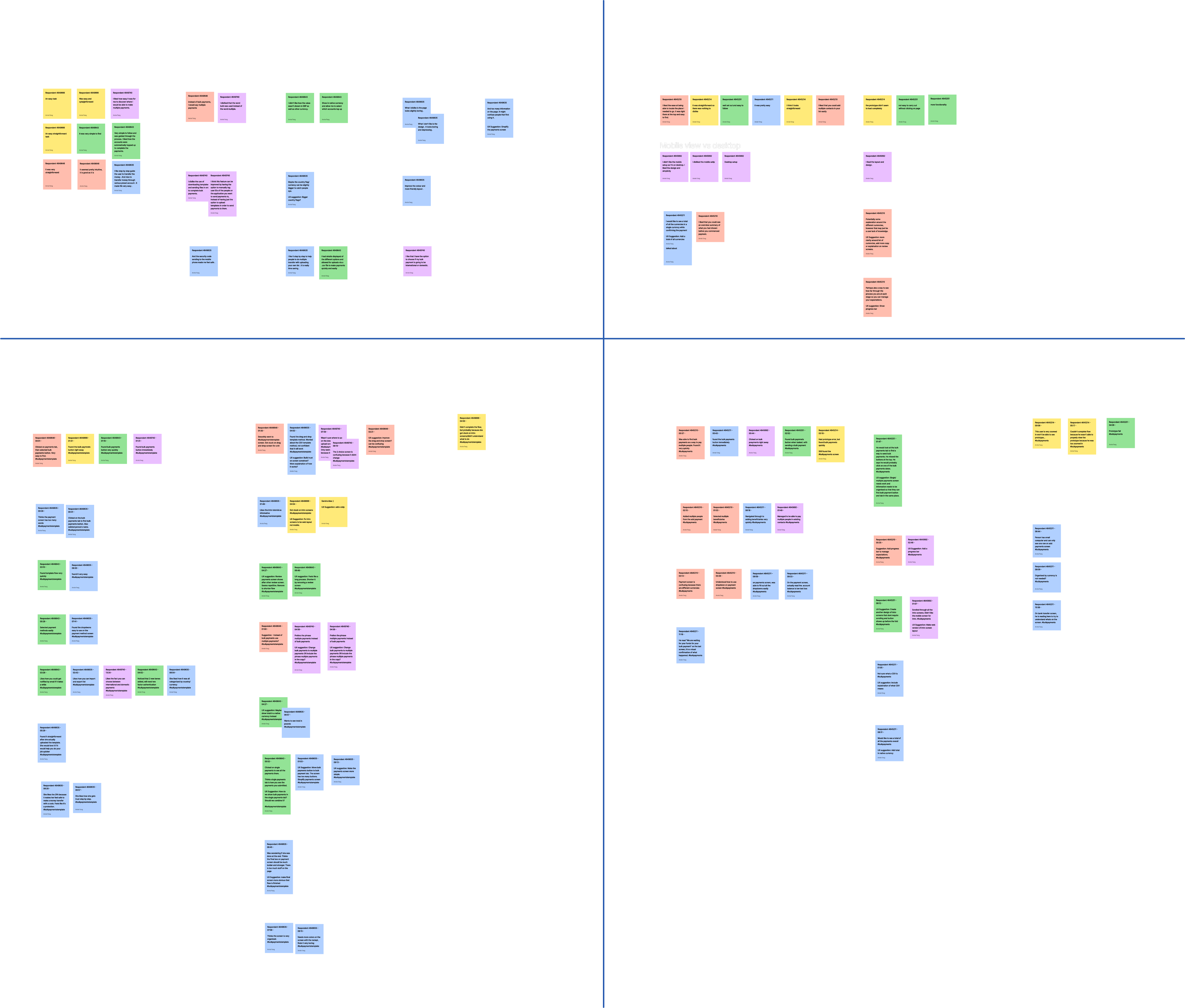
I ran two user tests to assess the usability of the batch payment flow: uploading a CSV (5 users) and adding payments manually (5 users). The findings were organised into an affinity diagram.
- Users appreciated the ability to streamline their workflow with fewer clicks.
- For CSV uploads, the summary of all payments and 2FA provided a sense of security and helped build trust.
- They found the payment process fast, and considered it a valuable time-saving feature.
- The summary page, organised by currency, offered a clear overview of selected options before confirming payments, which users liked.
- The introduction screens were helpful in guiding users through the process.
- Users appreciated being notified if a batch payment upload would take longer than expected.
- They liked the import/export functionality and the ability to choose between domestic and international payments.
- 9 out of 10 users found the batch payments button easy and intuitive to locate; 1 user took more time and was drawn to the batch payments tab instead.
- Overall, users found the template and recipient-adding process simple and straightforward.
Key insights
These improvements were made following analysis of user feedback.
UI design
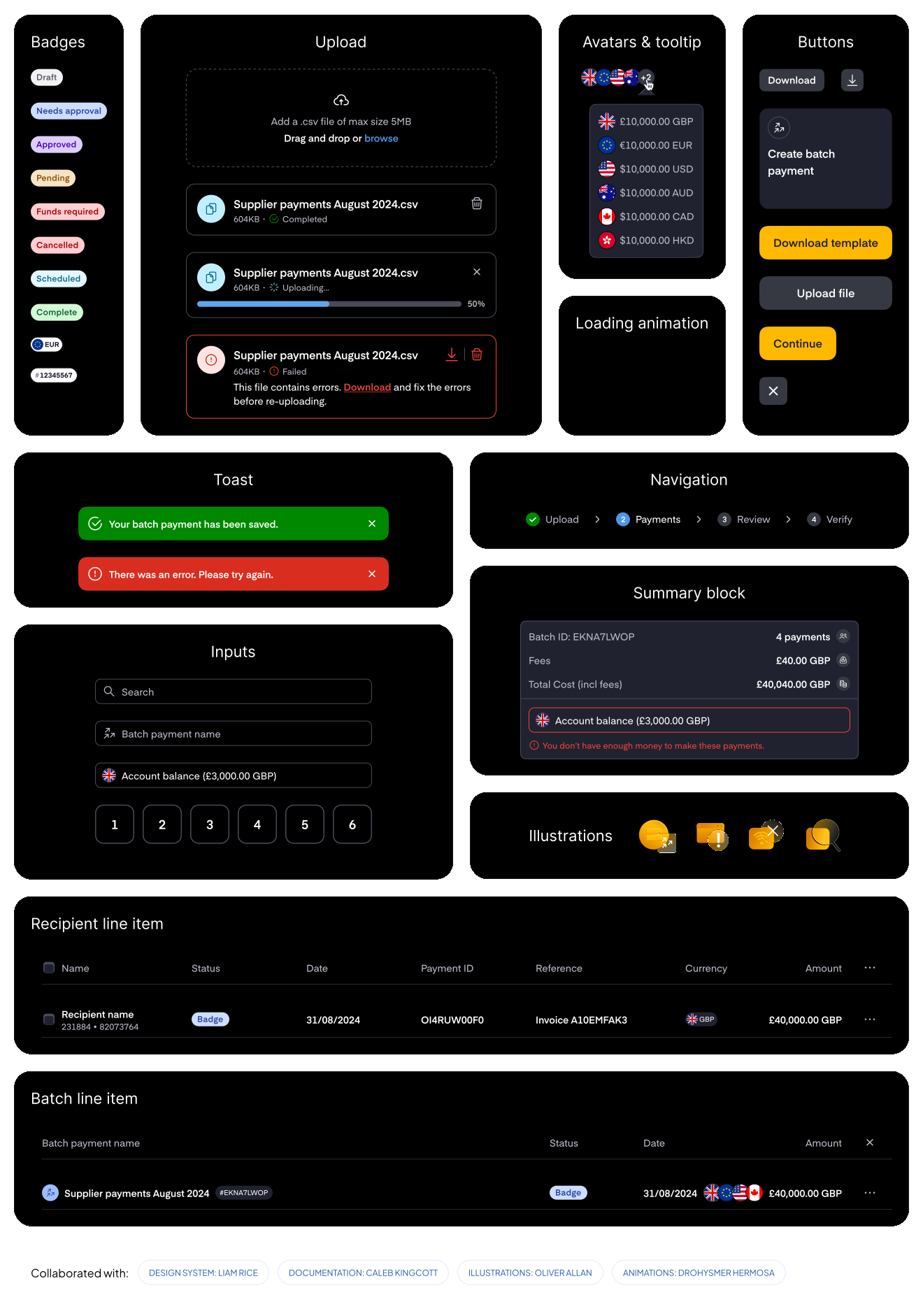
The designs were then restyled with new components, documentation, animations, and illustrations, created in collaboration with the design team at Equals Money.
High fidelity designs
Following testing, I incorporated the feedback into the final design.
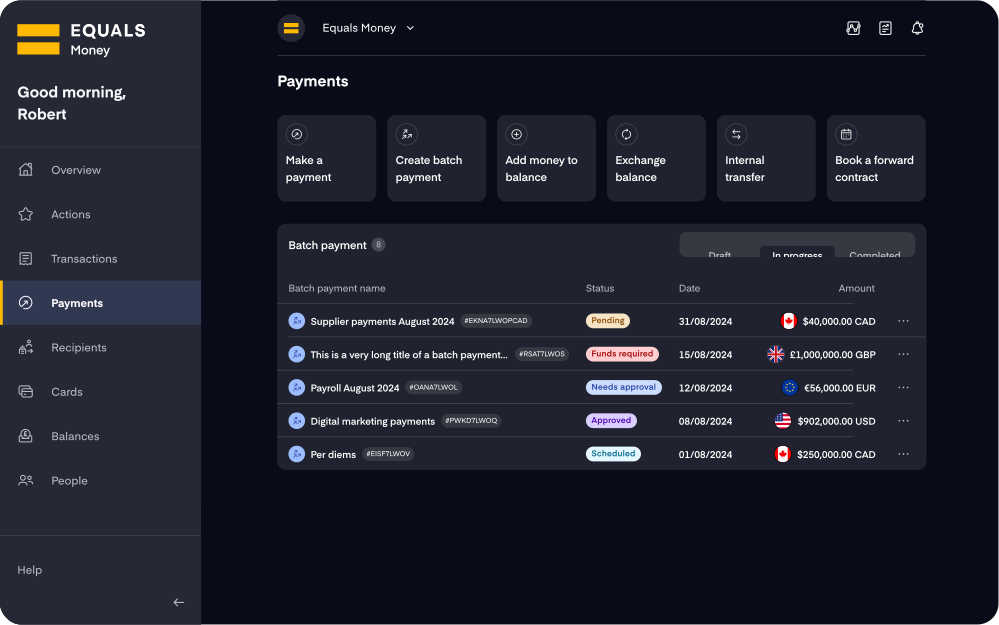
Consolidated payments page
During feedback sessions, users preferred to reach the batch payments flow with fewer clicks, so I consolidated the single and batch payments tabs so users could get to their batch payments more easily. The create-batch-payment flow itself was also streamlined to contain fewer steps.
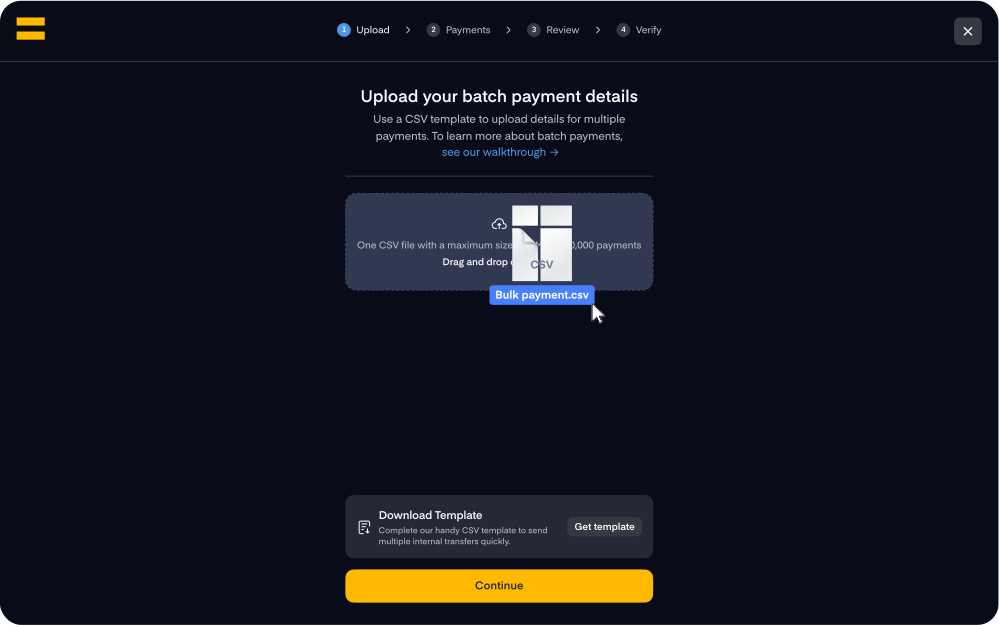
Upload CSV is a faster, more convenient way to create a batch payment
Often, a batch payment would be created from a previous template with a few tweaks, so I made it easier to upload a CSV from the first step of the journey.
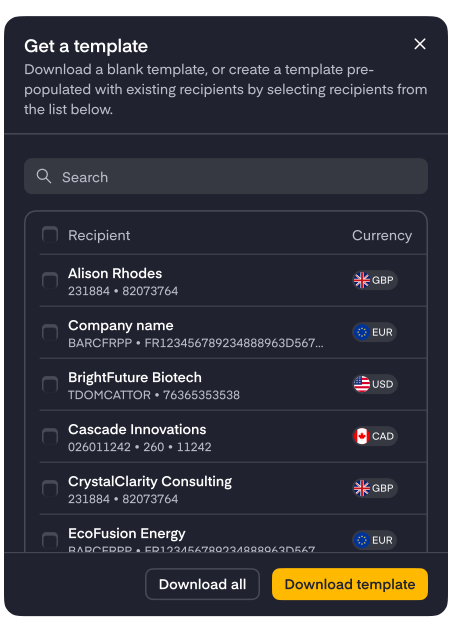
Easily download a template pre-filled with your saved recipient details
A popup modal lets users add recipient details to download a pre-filled CSV template.
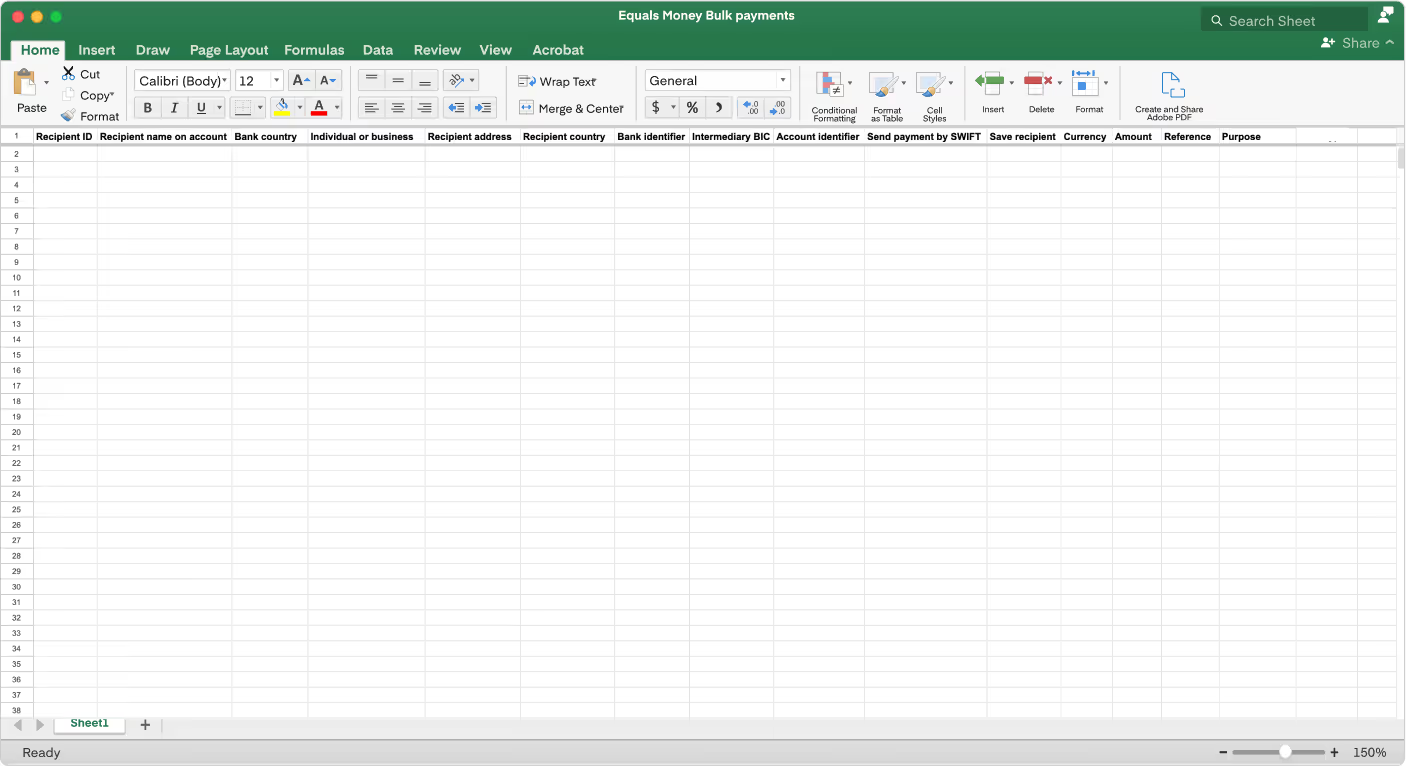
One CSV template to rule them all
Users want to make multi-currency batch payments. To support this, we created one CSV that can support all currencies. If there are any errors after uploading the template, the user can redownload the file with an error column to resolve and re-upload back into the platform.
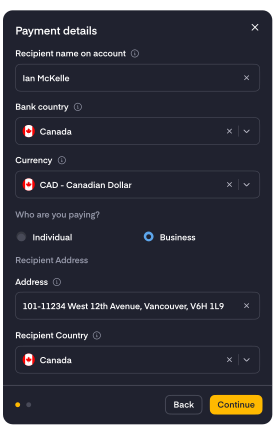
Edit in a popup instead of in the table
I decided to let users edit payments within a popup rather than in cells, since there was too much information from the CSV to fit on screen and it would have caused horizontal scrolling of the table, impacting usability. Putting all the information in a popup kept the screen organised and gave more room for error handling.
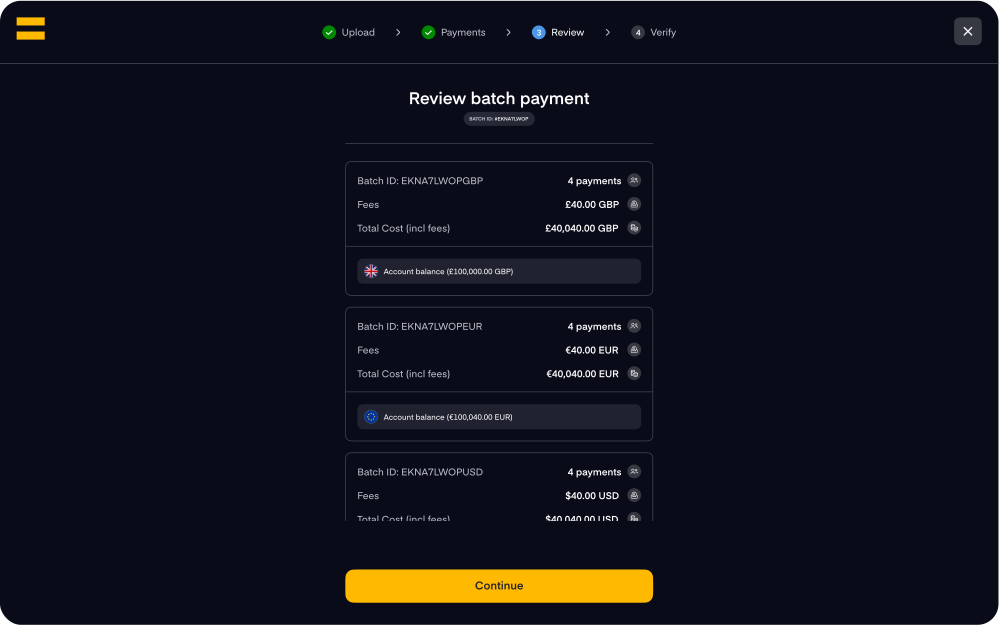
Summary screen amounts are grouped by funding balance
Users also wanted to view total amounts grouped by funding balance, as they used these totals to double-check that the file was uploaded correctly.
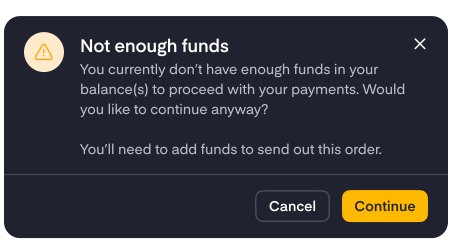
Allow them to submit if not enough funds
During my research, I learned that the person submitting the payments was also responsible for ensuring the account was funded. To provide more flexibility, especially for scheduled payments, I allowed users to submit a batch even if sufficient funds weren't available at the time. In these cases, the batch status shows as “Funds required,” making it clear that funding still needs to be arranged before the scheduled date.
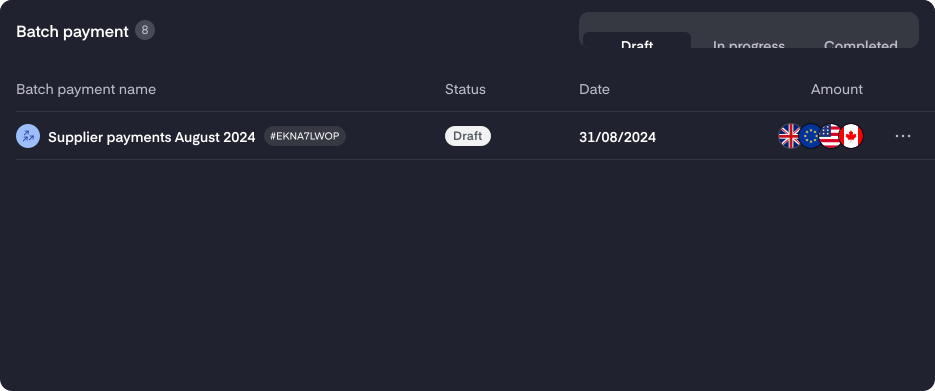
Drafts
Drafts were introduced to let users create a batch payment they could come back to later to submit — helpful for users who wanted enough time to double-check their payment details, or grab a second pair of eyes to review.
Impact
The Batch Payments feature addressed a clear customer need and laid the groundwork for scalable growth. Users could now send up to 10,000 payments in one go, using CSV uploads that fit seamlessly into existing workflows. We refined the experience with beta testers to improve error handling and decrease user errors. Since launch, we've expanded to support use cases like internal transfers, cutting batch creation time from hours to minutes. Internally, this reduced manual workload and saved time, and repeat usage continues to grow — showing strong adoption among high-volume clients.